描いた時間を、
消さないために。
So your drawing time
isn't lost.
いつもどおり Ctrl + S を押すだけで、その瞬間の .clip が自動で履歴に残ります。CLIP STUDIO PAINT(CSP)で絵を描く方のための、小さなバックアップアプリです。
Just press Ctrl + S as you always do, and the exact moment of your .clip is saved to history. A small backup app for people who draw in CLIP STUDIO PAINT (CSP).
※ 個人で作っている小さなアプリです。データの復旧までは保証できません。大切なファイルは、別の場所にもバックアップを取ってください。 * A small app built solo. We can't guarantee data recovery — please keep separate backups of important files.
やることは、たったの 3 つ。 Just three things to do.
-
01
Chro-NOS を起動する Launch Chro-NOS 裏で
.clipを見守る役 It watches your.clipin the background -
02
.clipファイルを登録する Register a.clipfile 最初の 1 回だけ、管理を始める合図 One-time setup, the kickoff -
03
CSP でいつもどおり絵を描く Draw in CSP as usual 保存(Ctrl+S)で履歴が積もる Save (Ctrl+S) builds your history
これだけです。あとはいつもどおり描いていれば、勝手に履歴が残っていきます。 That's it. Just keep drawing — your history builds itself.
むずかしい操作は、いりません。 No complicated steps required.
保存するたび、
自動でバックアップ。
Auto-backup
on every save.
CSP で Ctrl + S を押すだけ。アプリを開いて何かを操作する必要はありません。描くことだけに集中できます。 Just press Ctrl + S in CSP. No need to open the app or click anything. Stay focused on drawing.
過去のどの時点にも、
ボタン 1 つで戻せます。
Restore any past moment
with one click.
何時間前の状態にも、別パターンで描いていた途中にも戻れます。「あの配色のほうがよかった」と思ったら、選んで戻すだけ。 Roll back hours, or to a different draft branch. "The earlier palette was better" — just pick and restore.
制作の歩みを、
グラフで振り返り。
Visualize your
creative journey.
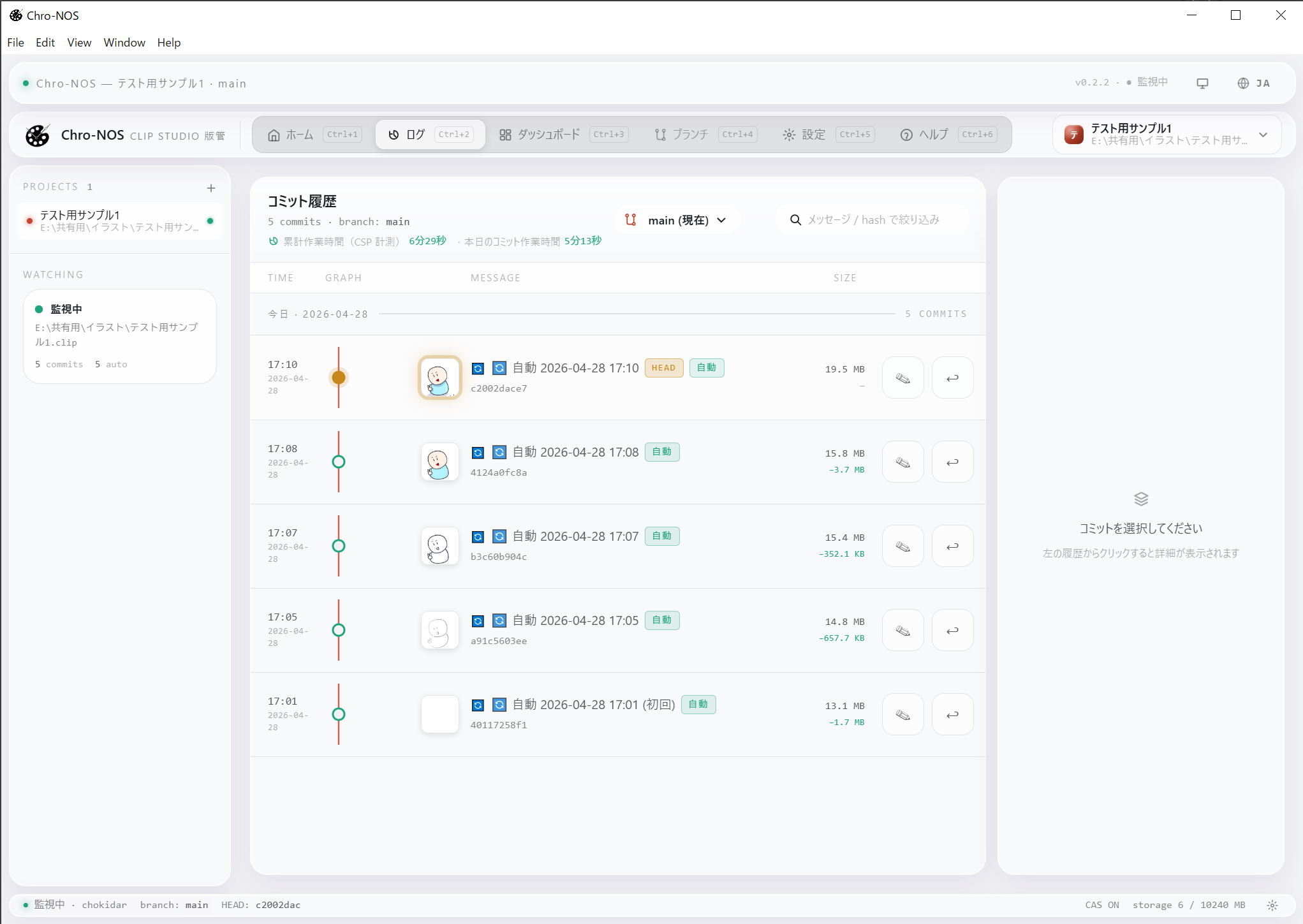
累計作業時間、レイヤー構成、保存ごとの履歴を 1 画面で。今日 / 今週 / 今月 / 今年 / 全期間で切り替えながら、自分の歩みを俯瞰できます。 See total work time, layer structure, and save-by-save history on one screen. Switch between Today / Week / Month / Year / All to look back on your journey.
描く。残る。巻き戻す。 Draw. Save. Rewind.
Chro-NOS を起動しているだけで、いつも通り描いて保存している間に、自動でバックアップを取ってくれます。あなたが何かを操作する必要はありません。 Just keep Chro-NOS running. While you draw and save as usual, Chro-NOS takes backups automatically in the background. No interaction required.
いつもどおり CLIP STUDIO PAINT で絵を描き、Ctrl + S で保存するだけ。アプリの操作は何もいりません。 Just draw in CLIP STUDIO PAINT and press Ctrl + S. No app interaction needed.
Chro-NOS を起動しておくだけで、保存した瞬間が自動で履歴になります。あなたが操作する必要はありません。連続した保存はまとめて記録されるので、履歴がごちゃごちゃになりません。 Just keep Chro-NOS running, and every save becomes a history entry automatically. You don't have to do anything. Rapid saves are grouped together, so your history stays clean.
※ このページでは、保存ごとに残される 1 件 1 件の履歴を「コミット」と呼んでいます。 * On this page, each individual save kept in history is called a "commit".
.clip を閉じるClose the .clip in CSP
.clip が書き戻ります.clip is rewritten to the state of 9b7e0d · 13:08
「あの時の絵に戻したい」と思ったら、一覧から選んでボタン 1 つ。巻き戻した事実も履歴に残るので、上書きで消えてしまうのを防ぎます。 "I want that earlier version back" — pick from the list, click once. The rewind itself is logged, so what you've drawn isn't overwritten away.
創作の時間を、
取り戻せる形にする。
Time, reshaped
into something you can return to.
Chro-NOS は CSP の中には入りません。ファイルを外から見守って、保存の瞬間だけを記録します。あなたの描き心地は、これまでのままです。 Chro-NOS never enters CSP. It watches your file from the outside and records only the moment you save. Your drawing experience stays exactly as it is.
タイムトラベル保存 Time-travel saves
保存するたび、その瞬間の .clip ファイルが自動で履歴に残ります。気が向いたときに、過去の任意の時点へ戻ることができます。「あの試行錯誤」も「途中でやめた案」も、上書きで消えてしまうのを防ぎます。
Each save is logged automatically. Any past moment is reachable at a click. Your hesitations and abandoned attempts stay with you instead of being overwritten away.
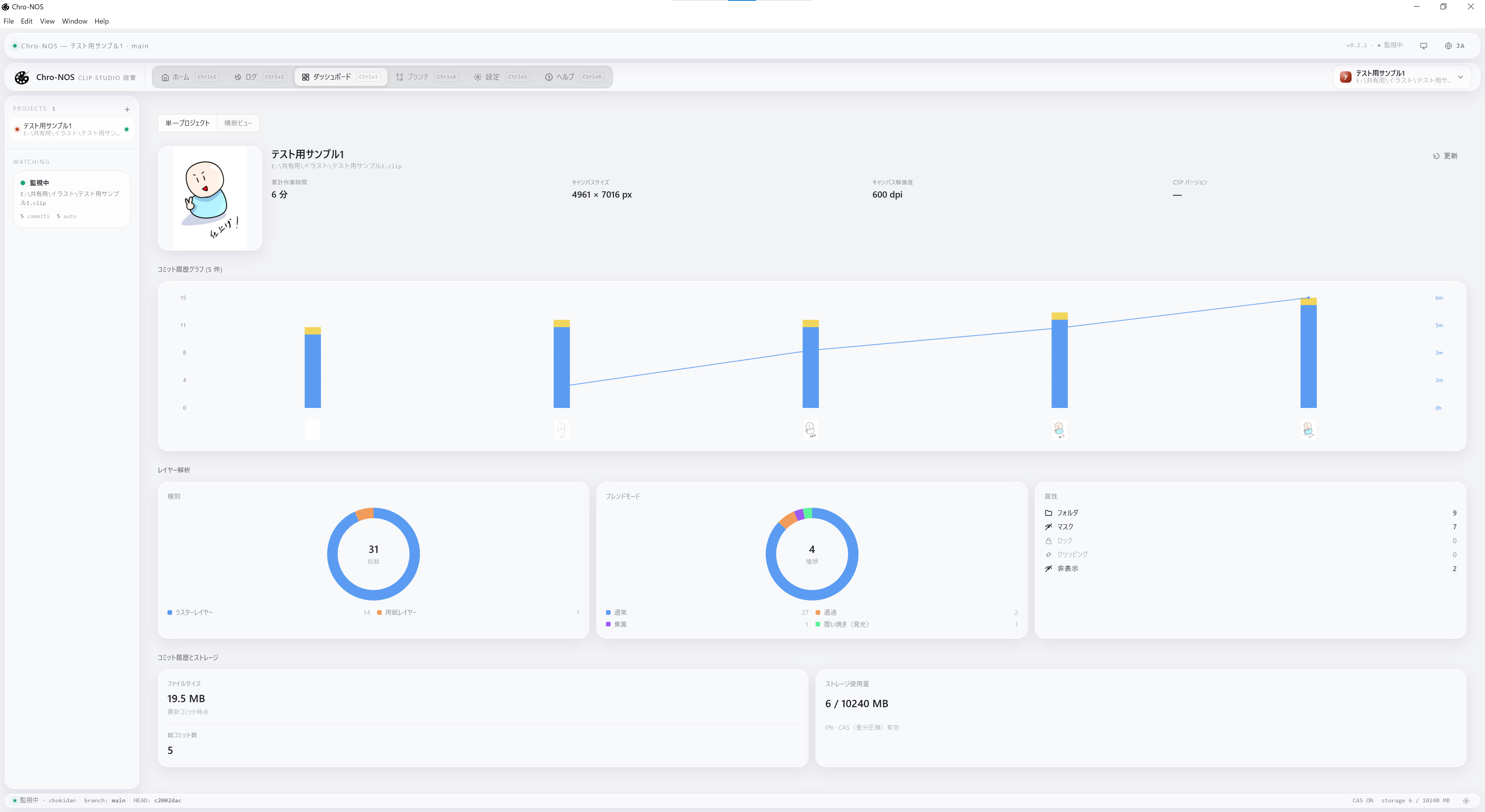
制作ダッシュボードで、
歩みを振り返る。
Look back through
your creative dashboard.
累計作業時間、レイヤー構成、保存ごとの履歴をグラフで一覧できる「制作ダッシュボード」を搭載しています。「今日 / 今週 / 今月 / 今年 / 全期間」と切り替えながら、自分の歩みを俯瞰できます。 The built-in dashboard shows your total work time, layer structure, and save-by-save history as charts. Switch between Today / Week / Month / Year / All Time, and see your creative practice from above.
完全ローカル + 11 言語対応。 Fully local, 11 languages.
あなたが描いた絵や履歴のデータは、あなたのパソコン内だけに保存されます。外部サーバーに自動でアップロードすることはありません。利用統計データは 初期 ON になっており、設定画面からいつでもオフに切り替えていただけます。送信されるのは匿名化された情報のみです。 Your drawings and history are stored on your computer only. Chro-NOS never uploads them to any server automatically. Usage analytics are on by default and can be turned off any time from Settings. Only anonymized data is sent.
アプリ本体は 11 言語に対応しています。日本語 / English / 繁體中文 / 简体中文 / 한국어 / Español / Português / Français / Deutsch / Bahasa Indonesia / ไทย。OS の言語設定に従って自動で切り替わります。 The app supports 11 languages: Japanese, English, Traditional Chinese, Simplified Chinese, Korean, Spanish, Portuguese, French, German, Bahasa Indonesia, and Thai. Automatically follows your OS language.
履歴は、
実測で 73.5% 小さくなります。
History, measured
73.5% smaller.
Chro-NOS は、保存するたびに 作業の差分だけをバックアップします。ファイルを丸ごとコピーしないので、何度保存してもディスク容量がほとんど増えません。 Chro-NOS backs up only what changed between saves. It doesn't copy the whole file, so your disk barely grows no matter how often you save.
※ 実測値です。ファイルの内容や保存パターンによって変わります。 * Measured values. Actual results vary by file content and save pattern.
手元のマシンで、すべて完結します。 Everything runs locally.
Chro-NOS は完全にローカルで動作します。外部サーバーへの自動アップロードは行いません。CSP のバージョンを問わず、ファイルシステム経由で .clip の保存を見て動きます。 Chro-NOS runs entirely on your machine. It does not upload your work anywhere automatically. It watches .clip saves via the filesystem, regardless of your CSP version.
- インストーラ形式Installer .exe (NSIS)
- 右クリックメニュー連携Context menu 対応Supported
- 自動更新Auto-update GitHub Releases
- データ保存先Data location .chronos/
- インストーラ形式Installer .dmg
- .clip ダブルクリック受領.clip open-with 対応Supported
- 自動更新Auto-update GitHub Releases
- データ保存先Data location .chronos/
その一筆を、いつでも振り返れます。 Every stroke, always there to look back on.
Chro-NOS β 版 v0.6.0 を公開中です。インストール後、いつもの保存(Ctrl + S)から、あなたの制作の歴史が積み重なっていきます。 Chro-NOS Beta v0.6.0 is now available. Install it, save as you always do — and your creative history starts to build itself.